The best lead management tools capture, track, and nurture prospects until they're ready to buy. Look for features like automated follow-ups, lead scoring, pipeline visibility, and multi-channel communication. Choose a platform that scales with your team and integrates with your existing tools.
What Makes a Great Lead Management Platform
A solid lead management platform does more than store contact information. It captures leads from your website, social media, and ads, then automatically nurtures them with personalized emails, SMS messages, or WhatsApp conversations. The system scores leads based on engagement, routes hot prospects to sales reps instantly, and tracks every interaction until the deal closes.
Great lead management software eliminates manual data entry, reduces response time from hours to minutes, and ensures no lead falls through the cracks. It gives your team complete visibility into which leads are engaging, which need follow-up, and which are ready to buy right now.
Essential Features to Look for in Lead Management Solutions
1. Automated Lead Capture and Distribution
Your lead management system should capture leads from multiple sources automatically:
· Website forms and landing pages
· Social media ads (Facebook, Instagram, LinkedIn)
· Chat widgets and live chat conversations
· Email inquiries and contact forms
· Third-party integrations (Zapier, webhooks)
Once captured, leads should be instantly distributed to the right sales rep based on territory, product interest, or round-robin assignment. This eliminates delays and ensures every lead gets immediate attention.
2. Lead Scoring and Qualification
Not all leads are equally valuable. Good lead tracking software scores prospects based on:
· Email opens and clicks
· Website page views and time spent
· Content downloads and demo requests
· Company size and industry fit
· Engagement frequency and recency
High-scoring leads get flagged for immediate sales outreach, while lower-scoring leads enter automated nurture sequences until they're ready. This helps your team focus on prospects most likely to convert.
3. Multi-Channel Communication
Modern buyers expect to communicate on their preferred channels. Look for platforms supporting:
· Email campaigns with automation and personalization
· SMS messaging for time-sensitive alerts
· WhatsApp Business API for conversational marketing
· In-app messaging and push notifications
· Phone calling with click-to-dial and call recording
Multi-channel support increases engagement rates and meets buyers where they already spend time.
4. Pipeline Management and Visibility
Your sales lead management tools should provide clear pipeline visibility:
· Visual deal stages from lead to close
· Customizable pipeline views by rep, product, or territory
· Automated stage progression based on lead behaviour
· Forecasting tools to predict monthly revenue
· Activity tracking (calls, emails, meetings) logged automatically
This gives managers real-time insight into team performance and helps reps prioritize their daily activities.
5. Automated Follow-Up Sequences
Manual follow-up is inconsistent and time-consuming. Strong lead management tools for small businesses include:
· Drip email campaigns triggered by lead behaviour
· SMS follow-ups for high-intent actions (pricing page visits, demo requests)
· Task reminders for sales reps when leads go cold
· Re-engagement campaigns for inactive leads
· Post-demo or post-call nurture sequences
Automation ensures every lead gets consistent follow-up without relying on memory or manual effort.
6. Reporting and Analytics
You need to know which channels drive quality leads and which campaigns convert. Essential reporting includes:
· Lead source attribution (which channels drive the most conversions)
· Conversion rates by stage and by rep
· Average time to close and deal velocity
· Campaign performance (open rates, click rates, response rates)
· Revenue attribution by campaign and channel
This data helps you optimize your marketing spend and improve sales processes continuously.
7. Integration Capabilities
Your lead management software for growing businesses should connect with tools you already use:
· CRM systems (Salesforce, HubSpot, Zoho)
· Email marketing platforms (Mailchimp, Brevo)
· Calendar tools (Google Calendar, Outlook)
· Payment processors (Stripe, Razorpay)
· Analytics platforms (Google Analytics, Mixpanel)
· Communication tools (Slack, Microsoft Teams)
Strong integrations eliminate data silos and create a unified view of every customer interaction.
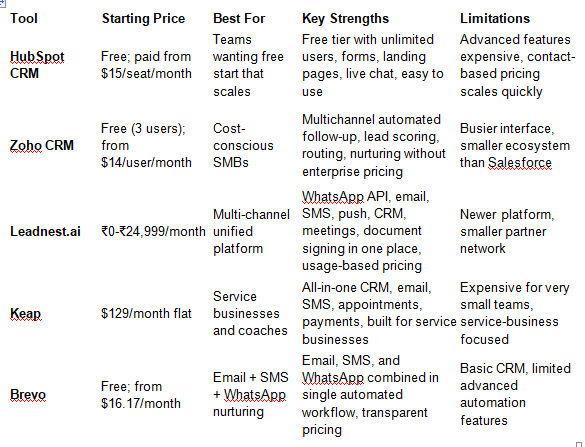 leadnest.aiBased on features, pricing, and user reviews, here are the leading options:
Lead Management Software for Growing Businesses: How to Choose
Step 1: Assess Your Lead Volume and Team Size
Under 100 leads per month with 1-2 sales reps? Free tiers like HubSpot or Zoho CRM work well. Over 500 leads monthly with multiple reps? Consider paid plans with automation and advanced routing. Project your growth over 12 months to avoid pricing surprises.
Step 2: Identify Your Primary Communication Channels
· Email-focused: HubSpot, Brevo, Pipedrive
· SMS + WhatsApp: Leadnest.ai, Brevo, Keap
· Phone-heavy: Freshsales, Close, Salesflare
· Multi-channel: Leadnest.ai, HubSpot, Salesforce
Step 3: Evaluate Integration Requirements
List the tools you currently use:
· CRM (if separate from lead management)
· Email marketing platform
· Calendar and scheduling tools
· Payment processors
· Analytics and reporting tools
Ensure your chosen platform integrates natively or via API/webhooks to avoid manual data entry.
Step 4: Calculate Total Cost of Ownership
Look beyond the sticker price:
· Base subscription cost
· Per-user or per-contact fees
· Add-on costs for SMS, WhatsApp, or advanced features
· Integration costs (API calls, middleware)
· Training and onboarding time
Usage-based models like Leadnest.ai can be more cost-effective for businesses with fluctuating volumes.
Step 5: Test with Real Data
Most platforms offer 14-30 day free trials. During the trial:
1. Import a small segment of leads (50-100)
2. Build one real automation workflow (not a demo scenario)
3. Send a test campaign and measure engagement
4. Evaluate the pipeline view and ease of use
5. Test customer support response
Step 6: Consider Implementation Time
Factor in:
· Data migration and cleanup (1-2 weeks)
· Team training (1-2 weeks)
· Initial workflow setup (1-2 weeks)
· Optimization period (4-8 weeks)
Plan for 6-12 weeks before seeing full ROI from your new system.
Common Mistakes When Choosing Lead Management Tools
Overlooking Mobile Experience
Sales reps work from phones and tablets. If the mobile app is clunky or missing key features, adoption will suffer. Test the mobile experience during your trial.
Ignoring Data Quality Features
Poor data leads to wasted effort and low conversion rates. Look for:
· Built-in email validation
· Duplicate detection and merging
· Data enrichment (company info, social profiles)
· Regular data hygiene tools
Choosing Based on Features Alone
More features don't mean better results. Prioritize:
· Ease of use for your team
· Customer support quality
· Integration with your existing tools
· Transparent pricing without hidden fees
Underestimating Training Needs
Complex tools require dedicated training. Factor in:
· Initial onboarding sessions
· Ongoing training for new hires
· Time for team to build workflows and templates
· Support resources (documentation, video tutorials)